Setting up a home studio is one of those jobs where the order you do things in matters more than the money you spend. Buy the monitors before you’ve thought about the desk, or the desk before you’ve thought about the room, and you’ll end up doing it all twice. YouTube is full of people who have already made those mistakes on camera so you don’t have to, but the useful channels are buried under hours of unboxing videos. Here are 33 that actually help, grouped by what stage of the setup you’re at: your first interface and microphone, desk layout and ergonomics, monitoring, small rooms, budget builds, podcast desks, hardware-heavy synth studios, and the computer and software side.
Jump to the section that matches where you are.
- Beginner setup walkthroughs
- Home studio tours & desk setups
- Audio interfaces & monitoring
- Microphones & vocal recording setups
- Small-room & apartment studios
- Budget setups
- Podcast & streaming studios
- Synth & hardware studios
- Studio organisation, cables & workflow
- Pro studio tours & inspiration
- Computers, DAWs & tech
- The desk underneath it all
Beginner Setup Walkthroughs
If you’re starting from an empty desk, these channels walk through what to buy, what to plug into what, and what you can safely ignore for now.
Sanjay C: Sanjay covers music production, gear and tips with a producer’s eye for what actually gets used. Videos like “Setting Up Your Studio – Tips & Tricks” and “What’s on my music studio desk?” walk through a working desk piece by piece and explain why each item earned its place, which is exactly the context a first-time buyer needs.
Alex Rome: Alex teaches music production, beat making and songwriting with the stated aim of helping new producers start making music at home. His home studio setup videos show the modest kit he actually works with, and his tutorial playlists pick up the software side once the hardware is connected.
Home Recording Made Easy: Built around coaching for the recording musician and the aspiring engineer, this channel runs from beginner to advanced across studio setup, DAWs (with a soft spot for Studio One), recording, mixing and mastering. The “How To Build a Home Studio for $500” walkthrough is a sensible shopping list for a first setup.
Home Studio Tours & Desk Setups
There’s no better way to plan your own space than to see how other people have solved the same problems: where the monitors go, how the desk is laid out, where the cables hide.
Mike Bello: A Melbourne-based producer and DJ who makes cinematic, design-led videos about studio builds and creative experiments. His “I Built My DREAM Home Studio” tour and “ULTIMATE Home Studio Setup” videos are detailed looks at a real home studio where the desk layout was planned rather than accumulated.
TAETRO: An Ableton-focused electronic producer with a dedicated “Desk & Setups” playlist. His “Minimalist Bedroom Studio Setup Guide” and the live call-in shows about home studios are all about how a producer’s desk and gear are arranged and used day to day, with a strong preference for keeping things simple.
Andrew Masters: Andrew covers home studio setup, drum recording, mixing and Pro Tools, and his video “The Ergonomics Of A HIGHLY FUNCTIONAL HOME STUDIO” is one of the few on YouTube that treats desk height, reach and comfort as seriously as the gear. Watch it before you decide where anything goes.
Audio Interfaces & Monitoring
The interface and the monitors are the two purchases you’ll live with longest. These channels explain the options and show you how to set them up properly.
Sweetwater: The video arm of the US retailer publishes a steady stream of product overviews, demos and comparisons of interfaces, monitors and monitor controllers. It’s a useful place to see a piece of gear explained feature by feature before you commit, with the caveat that they’d quite like to sell it to you.
SoundID from Sonarworks: Sonarworks’ channel supports its SoundID Reference speaker and headphone calibration software, and it’s aimed at everyone from bedroom producers to Grammy-winning mixers. The videos explain how to measure and correct your monitoring in an untreated room so that your mixes translate, which is one of the most valuable things a home studio can learn.
Universal Audio: UA’s official channel covers its Apollo and Volt interfaces and UAD plug-ins with tutorials, how-tos and artist interviews. The “Getting Started with Volt” guides walk through connecting and configuring an interface from scratch, which is helpful even if you end up buying something else.
Microphones & Vocal Recording Setups
A good vocal chain is mostly about placement and technique. These channels cover the microphones, the positioning and the settings that make the difference.
Curtis Judd: Curtis focuses on sound and lighting for video and podcasting, and his microphone, recorder and mixer reviews are thorough and consistently tested. If you’re recording voice at a desk rather than singing in a booth, his advice on mic technique and getting clean dialogue is directly applicable.
RØDE: RØDE’s official channel serves musicians, podcasters, filmmakers and streamers with product and educational content, including the recurring “RODE TV” and “Studio Rescue” series. It’s a clear reference for how their microphones and interfaces are meant to be positioned and configured in a home space.
Help Me Devvon: Devvon Terrell guides engineers, producers and artists through vocal recording, mixing and home studio setup in FL Studio and Pro Tools. Videos such as “Before You Buy A Bedroom Studio, Watch This” deal with the gear and room decisions behind recording vocals at home, and his delivery keeps it entertaining.
Small-Room & Apartment Studios
Most home studios are a bedroom, a spare room or a corner of the living room. These creators work in exactly those spaces.
Edward Smith: Edward’s tagline is “Let’s build your dream home studio!”, and the channel covers setup, budget gear, interfaces, microphones and MIDI keyboards. Videos like “The PERFECT Bedroom Studio Setup For Producers?!” and his annual desk setup tours are aimed squarely at fitting a working studio into a bedroom-sized room.
From Zero To Studio: The stated goal here is helping you record and mix radio-ready music from a home or bedroom studio. “How To Record PRO Sounding Vocals At Home – BEDROOM STUDIO TIPS” is typical of the channel’s practical, small-room approach to recording and mixing.
Modern Composer Dojo: Run by Japan-based producer and media composer Tateshi Starwalker, this channel posts practical tutorials, walkthroughs and reviews for producers and composers. His “Bedroom Studio 3.0” video shows a compact, standing-desk-based studio and how it evolved through several versions, which is a useful reminder that a setup is never finished.
Budget Setups
You can build a capable studio for surprisingly little if you know where the money matters. These channels do the price-point research for you.
Bedroom Producers Blog: The online magazine about free VST plugins, samples and loops also runs a YouTube channel showcasing the best free and low-cost software for home producers. It’s the place to build a capable plugin folder without spending anything, which is the software half of any budget setup.
KARRA: A vocalist and producer whose channel covers vocal production, DAW tutorials and songwriting. Her “Best Home Studio Setup” series lays out complete gear lists at $500, $1,000 and $3,000, which is a helpful way to see what changes as the budget grows and what stays the same.
Jorge Albuquerque: A Portuguese musician sharing his process for songwriting, recording and playing, with tutorials on studio setup, budget gear, interfaces, MIDI keyboards and Logic Pro. His “How to Build a Home Studio on a Tight Budget” is a current, no-frills guide to a low-cost first studio.
Podcast & Streaming Studios
A podcast desk has its own priorities: multiple voices, remote guests, and getting from recording to published episode without a fight.
Mike Russell: Mike, of Music Radio Creative, is an Adobe Certified Expert covering audio and video editing and smart workflows in Audition, Premiere Pro and Riverside. His “How to Record and Edit a Podcast From Start to Finish” tutorials take a podcaster from setup through to a finished episode.
Podcast Engineering School: Chris Curran’s channel is where people learn to engineer and produce podcasts at a professional level. It’s aimed at anyone who wants to treat a podcast desk as a real audio production setup rather than a plug-and-play kit, and it goes deeper on signal chain and processing than most podcast channels.
Riverside: Riverside’s channel offers best practices and actionable tips for podcasters and video creators using its remote recording and live-streaming platform. The full walkthrough videos cover the whole remote-podcast workflow from a home desk, from recording separate tracks to editing and repurposing.
Synth & Hardware Studios
Hardware studios have their own setup problems: MIDI and audio routing, power, and finding a desk that holds it all within reach. These channels live in that world.
loopop: Ziv Eliraz publishes in-depth electronic music and synth ideas, tips, tricks and reviews, with long-form reviews that are among the most thorough anywhere and a dedicated “Synth Setups” playlist. It’s the reference for choosing hardware synths and integrating them into a desk.
Red Means Recording: Jeremy Blake’s channel covers Ableton, the OP-1, Eurorack, modular synthesis and music technology in general, with a relaxed, hands-on style. It’s a good source of inspiration for hardware-heavy electronic setups and how the pieces fit together on a desk.
DivKid: Ben Wilson’s Eurorack and modular synth channel is full of module demos, workshops and problem-solvers like the Output Bus he designed with Befaco. If a modular rack is going to be part of your studio, his videos will help you plan it before you start buying modules.
Studio Organisation, Cables & Workflow
The difference between a studio you enjoy and one you avoid is usually organisation. These channels tackle the unglamorous parts.
Ricky Tinez: Ricky’s channel is focused on music and learning, covering synthesizers, beat-making and studio setups. Videos like “Connecting My Hardware to Software // New Studio Setup” and “I Think I Found The Best Studio Setup” are all about routing, layout and workflow decisions in a hardware-based home studio, and he’s honest about the changes of mind along the way.
BoBeats: Bo makes videos about synthesizers and production gear from Elektron, Korg, Roland, Yamaha, Teenage Engineering and Arturia. His “9 Tips How To Keep Your Home Studio Organised” tackles the practical problem of keeping a gear-heavy home studio tidy enough to actually use.
Joshua Krell: Joshua combines guitar tutorials with home recording techniques and gear reviews. “The Studio Organization Video I Wish I Made Sooner” and “Designing The Perfect Studio Desk Workflow For Home Studio” focus specifically on desk layout, cable tidying and organising a small recording space.
Pro Studio Tours & Inspiration
You won’t be building Abbey Road in the spare room, but seeing how professional rooms are laid out will sharpen your thinking about your own.
Abbey Road: The official channel of the world’s most famous recording studio offers a look at the rooms, consoles and working practices behind decades of records. “Inside Abbey Road: The Best Studio In The World” is the obvious starting point.
Gearspace: The official channel of the Gearspace.com community for audio engineers and producers has a “Studio Tours” playlist alongside trade-show coverage from Superbooth, NAMM and the like. It’s a reliable source of professional studio tours and walkthroughs of new gear as it appears.
The Blackbird Academy: The Nashville audio school attached to Blackbird Studio runs a mentor-based programme taught by working professionals on professional-grade equipment. Videos such as “Tour The Main Mic Locker” give a behind-the-scenes look at a major studio’s rooms and gear.
Computers, DAWs & Tech
The computer and software are the centre of every modern home studio. These channels will get you set up and past the first learning curve.
MusicTechHelpGuy: Josh Carney offers professional video tutorials for music production, recording and Logic Pro, including a full “Logic Pro 11 Essentials” course. It’s a structured way to learn a Mac-based DAW once the hardware is on the desk.
REAPER Mania: The home of Kenny Gioia’s REAPER tutorials, a large library of short, focused videos on one of the most affordable and lightweight DAWs available. If you’re on a budget or an older computer, REAPER plus this channel is a very strong combination.
Production Expert: News, reviews, tutorials and interviews across Pro Tools, Logic Pro, Studio One, Dolby Atmos and more, with an emphasis on practical workflows, plugin testing, hardware and studio setup. It’s the closest thing to a trade magazine for the software and computer side of running a studio.
The Desk Underneath It All
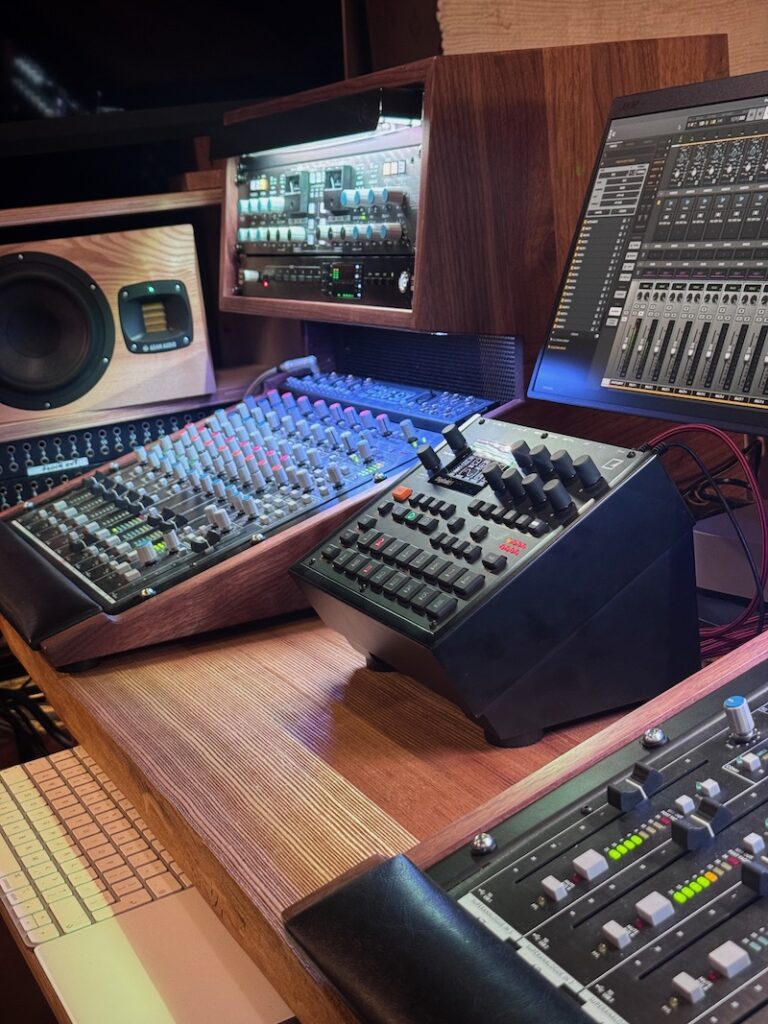
Every channel above will eventually leave you with the same problem: a pile of controllers, interfaces and rack gear fighting for space on a desk that was never designed for them. Mixingtable handcrafts solid hardwood desk stands, 19″ racks, modular synth cabinets and podcast gear stands to order in our Czech workshop, so your equipment sits at the right height and angle, your cables have somewhere to go, and the whole setup looks as good as it sounds.
Browse desk stands See 19″ racks
The Complete Channel Directory
All 33 channels, grouped by category, for quick reference.
Beginner Setup Walkthroughs
Home Studio Tours & Desk Setups
Audio Interfaces & Monitoring
Microphones & Vocal Recording Setups
Small-Room & Apartment Studios
Budget Setups
Podcast & Streaming Studios
Synth & Hardware Studios
Studio Organisation, Cables & Workflow
Pro Studio Tours & Inspiration
Computers, DAWs & Tech
Looking for channels on recording and mixing technique rather than setup? See our companion guide to the best home recording YouTube channels.